Introduction
 Every growing business eventually hits the same wall: too many manual tasks and not enough hours in the day. Sales reps copy-paste lead details into spreadsheets. Managers spend their mornings compiling yesterday's numbers instead of planning today's strategy. Operations staff chase invoices that should have generated themselves. This is exactly the gap that business process automation is designed to close replacing repetitive, error-prone manual work with code that runs reliably in the background, every single time.
As a Software Development Engineer at Revuteck, I've watched this pattern play out across dozens of client systems. The businesses that scale fastest aren't necessarily the ones with the most staff they're the ones who've engineered their operations so that staff time is spent on judgment, relationships, and strategy, while software handles the rest. This guide explains how the process works, from capturing leads to generating daily reports.
What Is Business Process Automation?
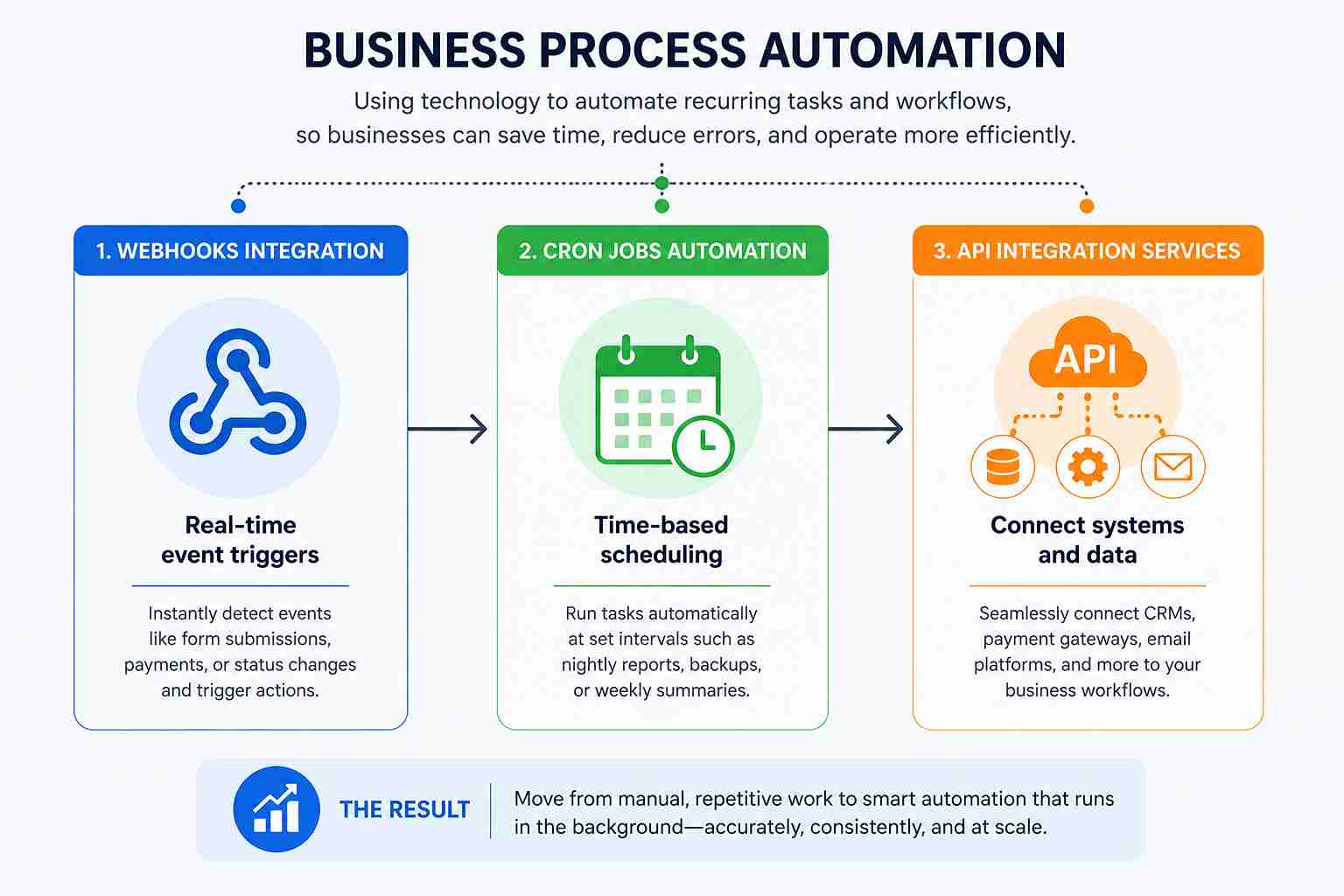 Business process automation (BPA) is the use of technology scripts, APIs, scheduled jobs, and integrated software systems to perform recurring business tasks without ongoing human intervention. Instead of a person manually triggering an action (sending an email, updating a spreadsheet, generating an invoice), the system detects an event or a scheduled time and executes the task automatically.
At its core, BPA rests on three engineering building blocks:
Webhook integrations are real-time tools that instantly respond when an event happens, such as a payment being completed or a form being submitted.
Cron jobs automation time-based schedulers that run background scripts at fixed intervals, like nightly reporting or weekly backups.
API integration services connective tissue that links third-party tools (CRMs, payment gateways, email platforms) directly into a company's own database and workflows.
Together, these three components allow a business to move from "someone has to remember to do this" to "the system already did it."
Why Manual Workflows Are Costing You More Than You Think
Manual processes don't just feel slow they create measurable business risk. A lead left unassigned for even a few hours is much less likely to convert. Response speed strongly predicts close rates in sales pipelines. A nightly report compiled by hand is one tired data-entry mistake away from giving leadership the wrong picture of the business. When sending an invoice depends on someone remembering to do it, payment delays are more likely to happen.
This is the practical case for business process automation: it isn't about replacing employees, it's about removing the operational drag that keeps good employees from doing their best work. When the routine is automated, the team's energy goes back into closing deals, solving customer problems, and making decisions, the things software still can't do well.
The Developer's Approach to Automation
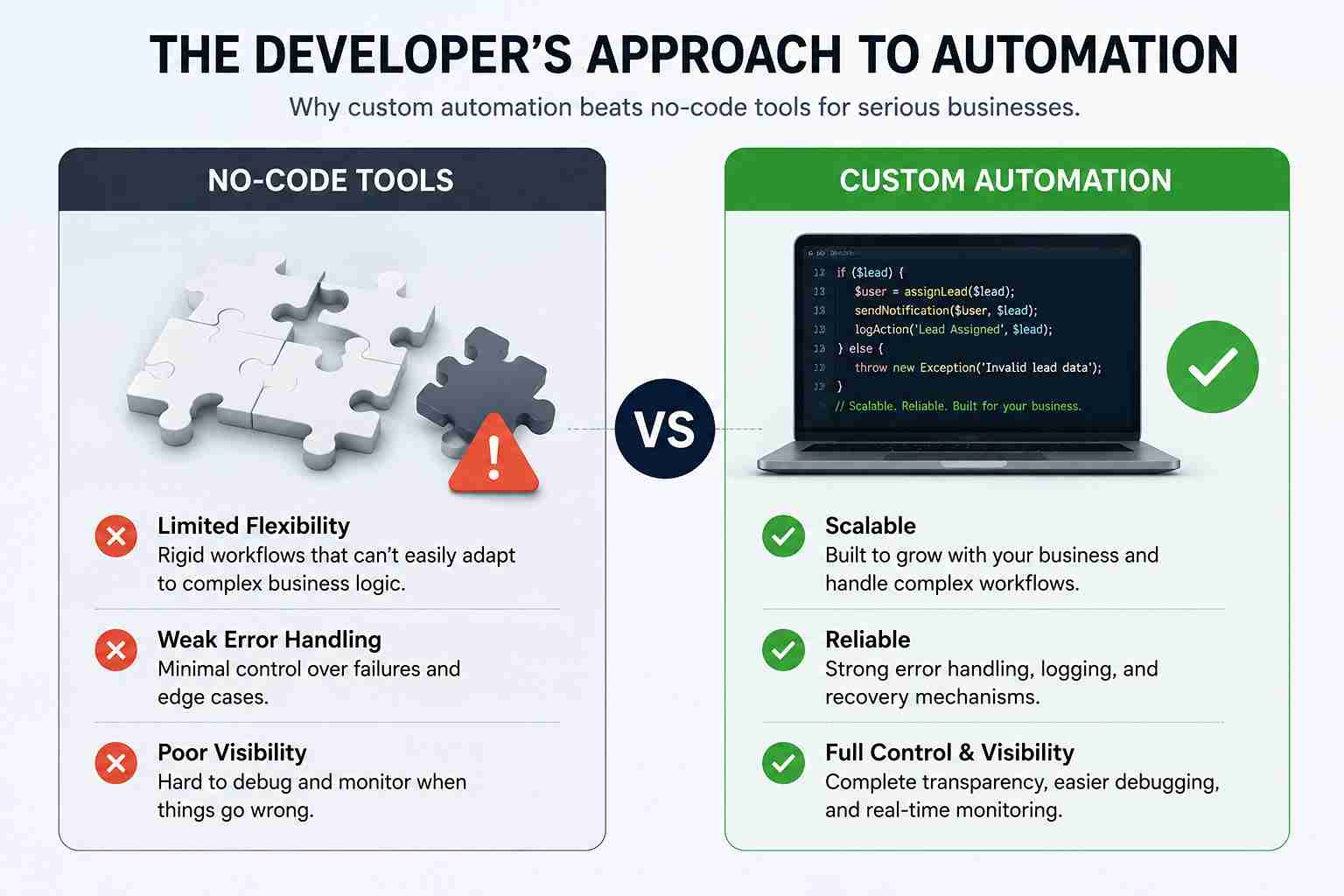 Off-the-shelf, no-code automation tools are useful for simple, low-volume tasks. But once a company is processing hundreds of leads a day, handling sensitive payment data, or running multi-step approval chains, those tools start to show their limits rigid logic, weak error handling, and poor visibility into what actually happened when something breaks. This is where custom-engineered automation, built directly into a company's backend, becomes the more durable choice for serious business automation solutions.
Webhooks: Real-Time Event Triggers
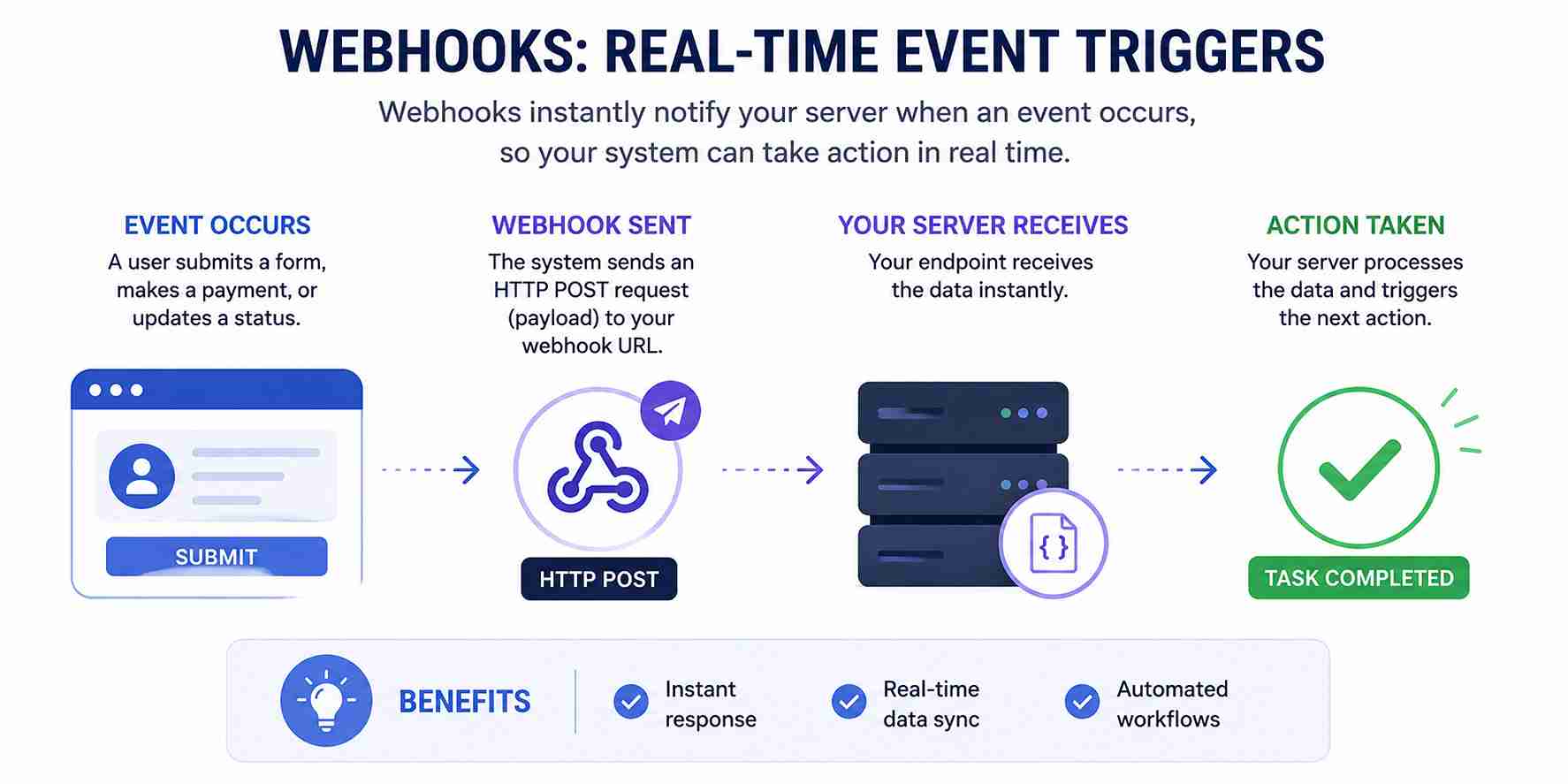 A webhook is essentially a notification system between two pieces of software. When an event happens, a form submission, a successful payment, or a status change, the originating system sends a payload to a specified endpoint, and the receiving server immediately acts on it. This is what makes near-instant lead routing and invoice generation possible.
Cron Jobs & Task Scheduling Systems
Not every action needs to happen in real time. Daily reports, weekly data backups, and monthly billing cycles are better suited to scheduled scripts commonly known as cron jobs that run automatically at a set time, with no one needing to remember to click "run."
API Integration Services
APIs are how a custom backend talks to outside platforms CRMs, payment processors, email providers without manual data transfer. Strong API integration services are what let a single sale trigger an entire chain of downstream actions across separate systems.
Automating the Lead Generation Pipeline
Lead management automation is usually where companies see the fastest, most visible return. A manually managed pipeline means leads sit in an inbox or spreadsheet until someone has time to look at them and "someone has time" is rarely fast enough.
A properly engineered pipeline handles the full lifecycle without a person touching it:
Data Capture & Validation A React application development front end captures the inquiry instantly, while backend validation sanitizes the input before it ever reaches the database, preventing junk or duplicate records.
Lead Assignment Software Backend logic evaluates each lead's attributes (location, budget, service needed) and automatically routes it to the right sales rep by updating the SQL database in real time.
Instant Notification API integration services push a notification to the assigned rep and trigger a personalized, automated welcome email to the prospect within seconds of submission.
The result is an automated lead management system where every inquiry is handled quickly, ensuring prospects receive a prompt response without the need for manual monitoring.
Streamlining Sales and Checkout with Sales Automation
Sales automation isn't only about generating leads; it's about what happens the moment a deal actually closes. A closed sale typically triggers a chain of administrative tasks invoicing, inventory updates, revenue logging and this chain is exactly where custom-built sales workflow management earns its value.
Here's how that chain runs without manual intervention:
Webhook Listeners When a payment completes, the gateway sends a secure webhook payload to the server.
Automated Invoice Generation The server catches that payload, dynamically builds a PDF invoice from the transaction data, and emails it to the client immediately.
Database Sync The system simultaneously updates inventory levels and logs the transaction in a revenue tracking system, keeping every department working from the same real-time numbers.
This kind of sales automation removes the lag between "deal closed" and "paperwork done," which matters both for client experience and for internal accuracy.
Strong sales workflow management also means the system doesn't stop at the invoice. Renewal dates, upsell windows, and follow-up reminders can all be scheduled automatically, so the sales team is nudged toward the next conversation instead of relying on memory or a sticky note. In practice, this is the difference between a sales process that depends on one person's discipline and a sales workflow management system that runs the same way every time, regardless of who's handling that account.
CRM Automation: Centralizing Customer Data
 CRM automation is the layer that ties lead management and sales automation together into one coherent customer record. Rather than juggling spreadsheets, email threads, and disconnected tools, a custom CRM development approach centralizes every interaction first inquiry, sales conversation, invoice, support ticket into a single source of truth.
Good customer data management through CRM automation typically includes:
Automatic logging of every customer touchpoint, with no manual data entry
Centralized records accessible to sales, support, and finance teams alike
Triggered follow-ups based on customer behavior (e.g., an abandoned quote or a renewal date approaching)
For companies evaluating business automation solutions, CRM automation is often the backbone that makes every other automated workflow useful, because it gives all of those workflows one shared, accurate dataset to work from.
Daily Operational Routines and Task Scheduling
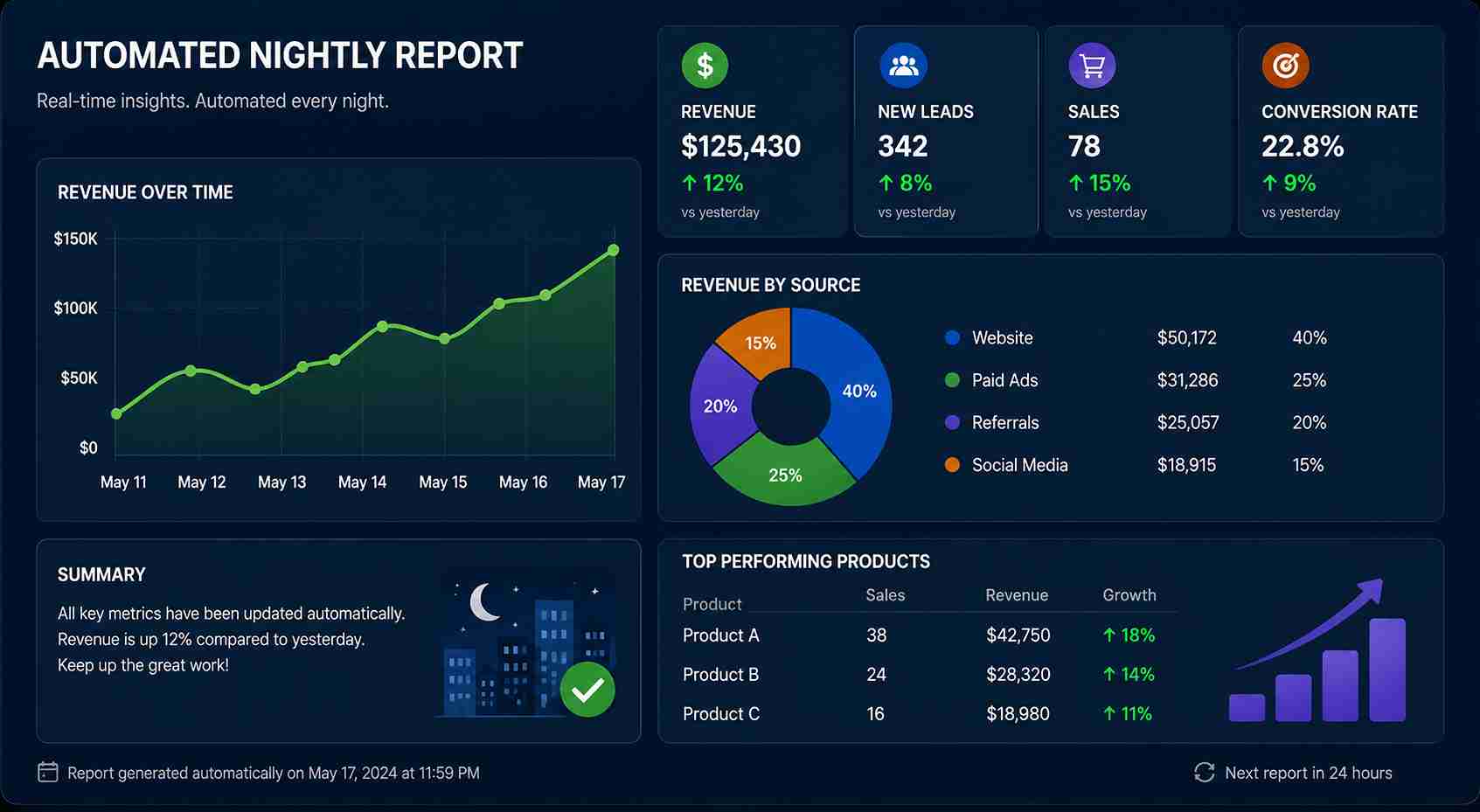
End-of-day operations often involve pulling data from several disconnected systems a process that can eat hours if done by hand. This is where task automation software, built around scheduled scripts, removes the grind entirely.
A typical setup looks like this:
Nightly Cron Jobs Server-side scripts run automatically at a fixed time, such as 11:59 PM, with no manual trigger required.
Data Aggregation These scripts query the database to total the day's leads, closed sales, and open support tickets.
Automated Reporting The system formats this data into a clean report and distributes it to leadership's inboxes before the next business day even starts.
This is enterprise workflow solutions at its most practical: a system that quietly does the reporting work overnight, so the morning starts with answers instead of a to-do list.
What separates a basic scheduled script from genuine enterprise workflow solutions is reliability under failure. A well-engineered cron job logs its own success or failure, retries when a data source is temporarily unavailable, and alerts the right person if something genuinely breaks instead of silently skipping a report and leaving leadership with stale numbers. That layer of resilience is what makes task automation software trustworthy enough for executives to actually rely on it every morning.
How Do You Actually Automate a Business Process? (Direct Answer)
If you're asking this question for your own business, the practical path looks roughly like this:
Map the current manual process step by step, noting every handoff between people and tools.
Identify the trigger is the task event-based (a payment, a form submission) or time-based (daily, weekly)?
Choose the right mechanism webhooks for real-time events, cron jobs for scheduled tasks, APIs to connect external platforms.
Build or integrate the backend logic that performs the task validation, routing, document generation, database updates.
Test for failure cases, not just the happy path automation that silently breaks is worse than no automation at all.
Monitor and iterate, since most workflows need refinement once they meet real-world data.
This sequence applies whether you're automating a single email trigger or building out full business process automation across an entire sales and operations pipeline.
No-Code Tools vs. Custom-Coded Automation
Factor
No-Code Automation Tools
Custom-Coded Business Process Automation
Best for
Simple, low-volume tasks
High-volume, complex, multi-step workflows
Flexibility
Limited to platform's built-in logic
Fully customizable to business logic
Data control
Often routed through third-party servers
Stays within company-owned infrastructure
Error handling
Basic, limited visibility
Granular, with custom logging and alerts
Scalability
Can become costly or rigid at scale
Built to scale with business growth
Setup effort
Fast initial setup
Higher upfront investment, longer-term payoff
Factor | No-Code Automation Tools | Custom-Coded Business Process Automation |
Best for | Simple, low-volume tasks | High-volume, complex, multi-step workflows |
Flexibility | Limited to platform's built-in logic | Fully customizable to business logic |
Data control | Often routed through third-party servers | Stays within company-owned infrastructure |
Error handling | Basic, limited visibility | Granular, with custom logging and alerts |
Scalability | Can become costly or rigid at scale | Built to scale with business growth |
Setup effort | Fast initial setup | Higher upfront investment, longer-term payoff |
The Tech Stack Behind the Magic
Reliable business process automation depends on a tech stack that can handle real-time events, scheduled jobs, and growing data volumes without breaking down. In day-to-day engineering work, that stack commonly includes:
Frontend: React Application Development
React is used to build dynamic, responsive interfaces that capture data seamlessly think lead capture forms or sales dashboards without forcing a page reload for every interaction.
Backend: Laravel Development
Laravel development provides the backbone for complex routing, API creation, background queue management, and secure webhook processing, all of which are central to backend development services built for automation.
Database: SQL Database Management
Relational SQL database management ensures data integrity and supports the complex querying needed for accurate, real-time reporting across leads, sales, and operations.
Measuring the ROI of Business Process Automation
Leadership teams rarely approve a new workflow just because it sounds efficient they want to see what it actually saves. Fortunately, the impact of business process automation tends to show up in a handful of measurable places:
Response time on leads. Automated lead assignment software typically routes a new inquiry in seconds rather than hours, which directly affects conversion rates since faster first contact is consistently linked to higher close rates.
Hours reclaimed from manual reporting. Teams that move nightly reporting to cron jobs automation often free up the equivalent of several hours per week that were previously spent compiling spreadsheets by hand.
Reduced billing errors. Automated invoice generation removes the manual data entry step where transposed numbers or missed line items typically creep in.
Faster cash flow. Because invoices and payment confirmations go out immediately through webhooks integration, there's less delay between a closed deal and the client receiving what they need to pay.
None of these gains require replacing staff they require shifting staff time away from data entry and toward the judgment calls that actually move the business forward. That reallocation is the real return on investment behind business process automation, and it's why the businesses that adopt it early tend to keep widening the gap over those still running on spreadsheets and memory.
Conclusion
Business process automation isn't about replacing the people who run a company it's about removing the friction that keeps them from doing their best work. By engineering reliable systems around lead management automation, sales automation, CRM automation, and scheduled task automation software, businesses can scale their operations without scaling their administrative headcount at the same rate.
If your team is still manually assigning leads, generating invoices by hand, or compiling reports late into the evening, that's a strong sign your operations are ready for custom-built business process automation. Start by mapping one repetitive task this week, and consider what it would look like if the system handled it instead of a person that single shift is often where the biggest operational gains begin.
FAQ Section
1. What is business process automation in simple terms? Business process automation is the use of software webhooks, scheduled scripts, and API integrations to perform repetitive business tasks automatically, without a person manually triggering each step.
2. How is business process automation different from sales automation? Sales automation refers specifically to automating sales-related tasks like checkout, invoicing, and revenue tracking. Business process automation is the broader umbrella that also covers lead management, reporting, and other operational workflows.
3. Do small businesses need custom-coded automation, or are no-code tools enough? No-code tools are generally sufficient for simple, low-volume tasks. Once a business handles higher lead volumes, sensitive payment data, or multi-step approval workflows, custom-coded business process automation typically offers more reliability and control.
4. What role do webhooks play in automation? Webhooks act as real-time listeners that trigger an action like generating an invoice or routing a lead the instant an event occurs elsewhere in the system, such as a completed payment or form submission.
5. Can CRM automation work alongside existing sales tools? Yes. CRM automation is typically built to integrate with existing payment gateways, email platforms, and sales tools through API integration services, centralizing data rather than replacing every existing tool.
6. How long does it take to set up business process automation for a sales pipeline? Timelines vary by complexity, but a focused lead management automation workflow can often be built and tested within a few weeks, while full enterprise workflow solutions covering sales, reporting, and CRM automation may take longer depending on integration requirements.
7. What tech stack is commonly used to build these automation systems? A common stack includes React for the frontend, Laravel for backend development services and API handling, and a relational SQL database for accurate data storage and reporting.